
Which Leverless Controller Layout Is Right for You?
When comparing leverless controllers, most people pay attention to various factors such as buttons, keycaps, or casing design. One more thing that should be taken into account is the layout of the buttons.
Layout can have a noticeable effect on how a controller feels and how easily you can reach its inputs. For example, two devices can have identical switches and inputs, but they will still differ in layout.
Different button spacing, different arrangement of the directional buttons, different position of the Jump button, and various distances between the left and right sides can heavily influence the movements of your fingers.
This is why there is a wide variety of layouts for leverless controllers. Some devices keep the buttons in a close position, while others use bigger or split layouts, which gives extra space for hands. Layout is more than just the distance between the left and right sides. Button spacing, button placement, Jump position, and the number of physical inputs can all affect how a controller feels in use. Minor changes in button layout can make a difference after many hours of practice.
Why Do Leverless Controllers Have Different Layouts?
The basic idea behind a leverless controller is relatively simple: movement and attacks are handled through individual buttons instead of a physical lever. But there is much more freedom in deciding exactly where those buttons should go.
The most familiar leverless designs use a compact, mostly parallel arrangement. The directional buttons sit together on the left, while the main attack buttons form a larger cluster on the right. This keeps the overall controller relatively narrow and makes the distance between commonly used buttons predictable.
Other designs take a more open approach. A split or separate layout places the left and right button groups farther apart, and some designs also angle the two groups rather than keeping them completely parallel. This type of layout has become increasingly visible among players who feel that a traditional arrangement forces their hands too close together.
Button count introduces another layer of difference. A controller does not necessarily need more buttons to be better, but additional physical inputs can give players more places to assign commands.
So when you look at a leverless controller, it is worth thinking about more than the number printed in the product name. The layout determines how those inputs are arranged, while the button count determines how many physical options you have.
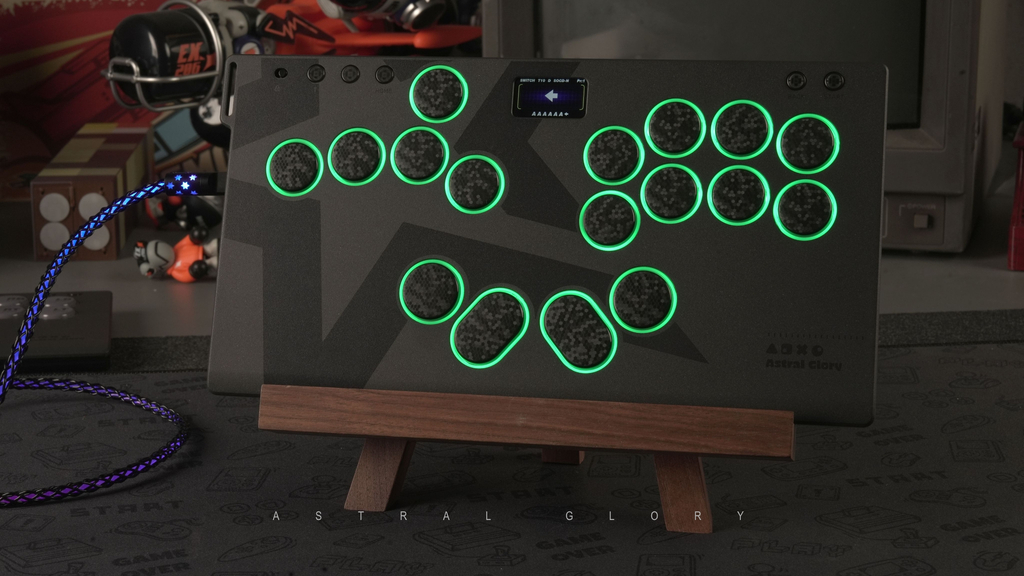
Split vs. Compact: What Actually Changes?
The difference between a compact and split layout is easiest to understand by looking at where your hands naturally sit.
With a compact layout, the two hands are positioned relatively close to one another. This creates a small overall footprint and keeps the controls within a short reach of the fingers. For players who are already comfortable with a conventional leverless arrangement, this can feel familiar and efficient.
A split layout increases the distance between the two sides. Depending on the design, the button groups may also be angled slightly outward. The idea is not simply to make the controller larger; it is to change the position of the hands so they do not have to remain as close together.
That difference can be surprisingly noticeable. Some players have reported that standard layouts feel too inward for their natural wrist and forearm position, while split or angled layouts feel more natural. In a 2026 Reddit discussion , one player described a standard layout as uncomfortable and found the wider spacing of a split design much more comfortable.
At the same time, a wider layout is not automatically more comfortable. If you naturally prefer keeping your hands close together, increasing the distance between the two sides may simply make the controller feel unnecessarily large.
The important part is not whether the controller is technically “split” or “compact.” It is whether the physical arrangement matches the position your hands want to take.
How Do Button Spacing and Layout Affect Your Hands?
Layout is not only about the distance between your left and right hands. The spacing between individual buttons matters too.
When buttons are placed close together, your fingers have less distance to travel. This can make a controller feel compact and quick, but it can also feel crowded if the spacing does not match your hand size or pressing habits. Wider spacing gives your fingers more room, although it also means that certain buttons require a slightly larger movement.
This is particularly noticeable on the directional side. A player coming from a keyboard, for example, may already be accustomed to having movement keys separated in a particular way. Someone used to a conventional leverless layout may have completely different expectations.
The same applies to the action buttons. Not every player uses every button with exactly the same finger. Some rely heavily on their index, middle, and ring fingers, while others use their thumb for certain inputs. Once you start thinking about the controller this way, button placement becomes less about the visual shape of the board and more about the movement of individual fingers.
The HautePad Emotion III-17 illustrates this idea with its 17-button arrangement. Its additional inputs give players more physical locations to assign commands instead of requiring every function to share the same core group of buttons. The controller’s manual lists M1, M2, and M3 as additional programmable buttons.
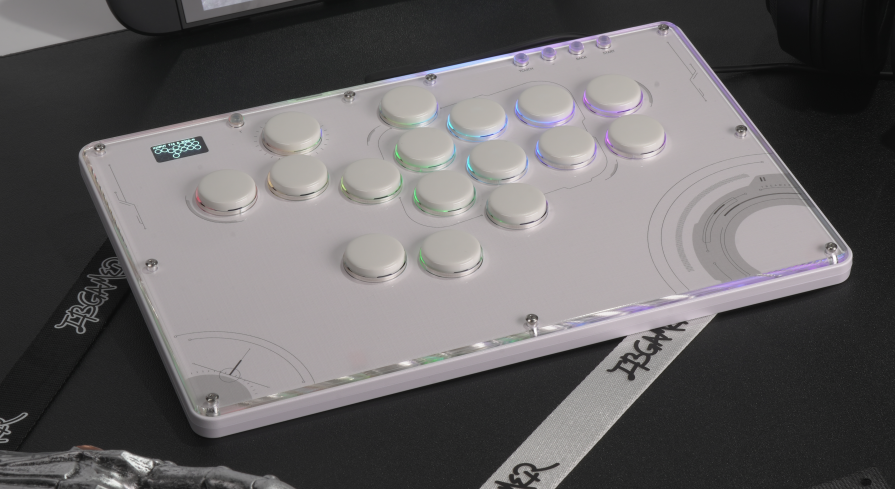
Meanwhile, a more straightforward layout such as the HautePad V16 keeps the overall arrangement easier to approach while still offering a dual-jump-button setup. That gives players another physical option for handling the Up input without turning the entire controller into a much more complicated layout.
Button spacing is only part of the picture. The position of individual inputs can also change how a layout feels, especially when it comes to the jump button.
What About the Jump Button?
The Up button deserves special attention because it is one of the most noticeable differences between leverless layouts.
On a traditional Hitbox-style arrangement, the directional buttons are grouped together, with Up commonly positioned underneath the other directional inputs and operated by the thumb. This arrangement has become familiar across a large part of the leverless market.
But there is no requirement for every player to use the exact same physical position.
Some controllers provide an additional Up input, allowing players to choose the location that feels more natural. The HautePad V16 Future White is one example, using a dual-jump-button layout. For some players, this can make certain movement techniques or game-specific inputs easier to access without changing the rest of the controller.
The question is therefore less about whether one Jump position is correct and more about which finger you want to use and where that finger naturally rests.
This becomes even more relevant in games with unusual movement systems or multiple frequently used commands. As fighting games continue to experiment with different mechanics, having another physical input can sometimes be more useful than simply having a larger main button cluster.
Do More Buttons Always Mean a Better Layout?
Not necessarily.
A controller with 17 buttons may give you more options than one with 12 or 13, but having more choices does not automatically make the layout easier to use. In fact, additional buttons only become useful when they are placed somewhere you can comfortably reach and when you have a clear reason to assign something to them.
The same principle applies to split layouts. A wider controller can give your hands more space, but if you naturally prefer a compact position, the additional width may not help you. This is why comparing layouts purely by counting buttons can be misleading.
How Can You Tell Which Layout Is Right for You?
The easiest way to judge a layout is to stop looking at the controller and pay attention to your hands.
Think about where your wrists naturally want to sit. Do your hands feel crowded when the two sides of the controller are close together? Or does a wider layout make you reach farther than necessary?
Then look at the individual buttons. Are your fingers landing in the center of the buttons, or are you constantly reaching toward one side? Is the Jump button comfortable to reach with the finger or thumb you actually want to use? Do you regularly wish you had an extra physical input?
Remapping buttons can also make a difference. Most leverless controllers allow you to change what individual buttons do, so you can move frequently used functions closer to the fingers or thumb that you naturally use. Some players also experiment with extra physical buttons or different button placements depending on which inputs they use most often. In a recent Reddit discussion about split-layout leverless controllers, players compared the C16S and Emotion III-17 specifically in terms of button placement, extra inputs, and how naturally their fingers rest on the controller.
These questions are more useful than simply asking whether a controller has 12, 16, or 17 buttons. A controller such as the Emotion III-17 gives you more physical inputs to experiment with, while the V16 Future White keeps things closer to a familiar compact arrangement while still offering some additional flexibility through its button setup.
The important part is whether those options actually make your inputs easier to reach and use. If your current layout already feels comfortable, there may be little reason to change it simply for the sake of having more buttons.
Conclusion
Leverless controller layouts are becoming more varied as players pay closer attention to how different button arrangements affect the way they play.
The difference between two controllers is not always found in their switches or response time. Sometimes it comes down to the space between two button groups, the position of the Jump button, or an extra key that sits naturally under a finger.
A compact layout keeps the controls close and familiar, while a split layout gives the hands more room to spread out. Extra buttons can provide more options for assigning commands, but they only help when those inputs are easy to reach and actually useful.
When comparing layouts, pay attention to your own hands. Notice where your wrists settle, which fingers you use most, and whether certain buttons feel too close or too far away. Those small details are often what determine whether a layout feels comfortable over a long session.
There is no single layout that works for every player. The right one is simply the arrangement that fits your hands, your habits, and the way you play.