
What Evo France 2026 Revealed About Playing MARVEL Tōkon on Leverless
Evo France 2026 offered players a valuable reference point for exploring leverless controllers in MARVEL Tōkon: Fighting Souls. PAR | Zando won the tournament, which recorded 472 entrants, and both Grand Finalists used leverless controllers.
For players considering this control method, the next step is understanding how MARVEL Tōkon’s attacks, assists, and character-switching mechanics affect controller layout. From button placement to extra inputs, the right setup can help make these actions more comfortable and consistent.
MARVEL Tōkon Requires More Than Basic Attack Inputs
Unlike a traditional one-on-one fighter, MARVEL Tōkon: Fighting Souls uses a four-character team system. Players control a lead character while bringing teammates into battle through assists and switching mechanics.
This creates several layers of input to manage. Players need to perform basic attacks, execute skills, call assists, and switch characters at the right moment. These actions must fit into the same button layout without making common inputs unnecessarily difficult.
According to PlayStation’s official beginner’s guide, the standard PS5 control scheme assigns Light, Medium, and Heavy attacks to the Square, Triangle, and Circle buttons, respectively. The Cross button is used for Assemble Assist, while L2 supports character switching through directional inputs.
The game also offers Quick Skills and traditional Command Inputs. Quick Skills allow players to execute skills with a single button press, while Command Inputs reward successful execution with slightly higher damage and additional Skill Gauge.
These mechanics matter when choosing a leverless layout. A player must consider not only which buttons are available, but also how comfortably they can reach frequently used actions while maintaining accurate inputs.
Button Layout Matters More Than Button Count
One practical lesson for leverless players is that adding more buttons does not automatically make a controller better.
A standard leverless controller typically separates directional inputs from attack buttons. This arrangement can make simultaneous inputs easier to coordinate because movement and attacks are handled by different fingers.
In MARVEL Tōkon, functions like Assemble Assist, Tag, and Quick Skills need to be taken into account by players. Depending on each player’s preference for controls, they may find some options more suitable with dedicated buttons while others can remain as combinations.
For instance, a person who frequently calls assists would like to keep this move near the regular attack buttons. In contrast, another player may prioritize quick access to skills or switches in the character. There is no one correct solution; each player has to make his/her own choice based on his or her actions.
When comparing leverless layouts, consider three questions:
- Accessibility: Can you reach important actions without moving your fingers awkwardly?
- Input conflicts: Are you likely to press the wrong buttons when performing attacks and team actions together?
- Consistency: Can you repeat the same inputs reliably during movement, combos, and defensive situations?
These factors are more useful than choosing a controller based on its button count alone.
Extra Buttons Can Offer More Flexibility
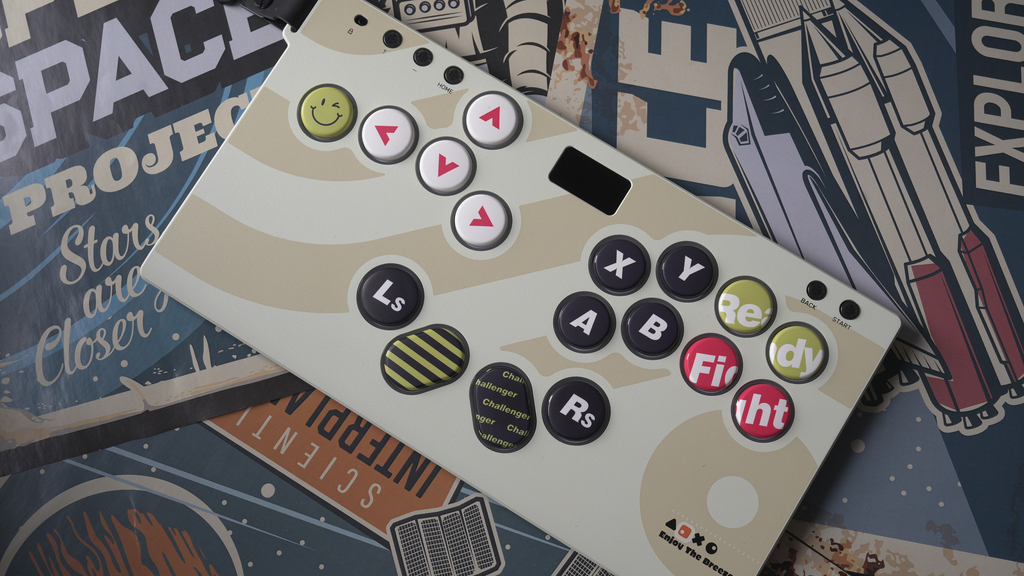
Controllers with additional buttons give players more options when customizing their layouts. This can be useful in a game where attack inputs and team mechanics compete for convenient positions.
A controller incorporating 17 buttons like HautePad Emotion III-17 comes with advantage of providing extra buttons which can be assigned by the player to his discretion depending on their game playing preferences including buttons for particular special actions. However, increase in the number of buttons only brings in more options and decisions. New configuration can enhance the process of mastering the game, particularly for beginners.
It is advisable to determine the functions and commands most utilized before switching to a more complicated leverless controller. It does not always mean that having more buttons will somehow improve the efficiency of your actions.
Test Assist and Tag Inputs Before Changing Your Layout
Team mechanics are central to MARVEL Tōkon, so testing them should be part of any controller setup process.
Start with the default control scheme and learn how the game handles assists and character switching. PlayStation’s beginner’s guide explains that pressing Cross calls an Assemble Assist, while directional inputs can determine which teammate is called. Character switching uses directional inputs with L2 under the standard PS5 control scheme.
Once you understand the default behavior, practice the actions you use most frequently. Try calling an assist during a combo, switching characters, and returning to basic attacks without losing control of your movement.
If an input repeatedly fails, do not immediately assume that you need a different controller. First, check the assigned button, the required input combination, and the timing. Change one assignment at a time so you can identify whether the adjustment actually helps.
Training Mode is a useful place to identify input issues before changing your layout. If you’re unsure how to configure your buttons for the game, check out our detailed guide on How Should You Set Up Leverless Controller for Marvel Tōkon.
Competitive Play Is Still Evolving
Evo France provides a snapshot of the game’s early competitive development, not a final answer about the best controller or button layout.
In a September 14 communication to developers via Steam, the game director remarked that players had figured out that they could utilize characterization and assist systems more efficiently than expected by the team, and that it was thinking of tweaking some assist systems and switching cooldowns alongside input sensitivity. It must be noted that this information is crucial as changes in gaming mechanisms can lead to the frequent use of a particular action or preference given to them when orders are given through the controller, but this does not mean that any specific leverless setup is best.
Players ought to pay attention to the latest patch notes rather than relying on the former settings as the game might change and the gameplay that worked well today may need some adjustments.
How to Choose Leverless Controller for MARVEL Tōkon
When picking all-button controller for MARVEL Tōkon, it is important to consider three key points.
Platform compatibility: Ensure that the controller is suitable for the platform you are using. Check the manufacturer’s specifications as different versions may have varying compatibilities.
Comfort and layout: Ensure that the attack and directional buttons suit your hands, as well as how easy it is to reach the commands you frequently use.
Configuration options: Look into the game and controller’s features for various functions and see if the buttons you wish to utilize can be programmed. Note that just because you have additional buttons doesn’t mean you are at an advantage.
If you are unfamiliar with leverless, start with a basic layout, and try out the controls of the game before adding layers to your layout.
At Evo France 2026, both Grand Finalists used leverless controllers. That shows the control method was represented at the highest level of this event, but it does not establish that leverless is superior to other options. The best choice remains the one that supports your playstyle and lets you perform your intended actions consistently.
Conclusion
Evo France 2026 offers a useful reference point for players exploring leverless controllers in MARVEL Tōkon: Fighting Souls. The fact that both Grand Finalists employed this approach means that the event showcased its success within competitive playing. In order to make the right choice regarding the use of leverless controls, players must learn how the team dynamics in the game influence what kind of controller to use, thus benefiting from a design that suits their personal playing style.