
How to Test Switches Before Buying Leverless Controller
Players generally pay attention to the physical layout of leverless controllers, arrangement of the buttons, size of the controller, and compatibility with gaming devices while selecting one. However, one more component of a leverless controller influences the way the buttons feel to a player.
It is especially important in games involving fighting. With these controllers, players use buttons to move their character and attack the opponent, and this fight can require one and the same command to be repeated many times. It may be difficult to identify the preferred feel of the switches if the player has never tried a variety of them before.
Making sure you test the switches before buying all-buttons controller can help to make the choice easier.
Why Test Switches Before Buying Leverless Controller?
Although a product page will give you the switches used in a controller, the specifications would not indicate if you would like their feel.
Different switches may have different actuation strength, travel distance, or feedback even though they are kept under the same category as suitable for gaming. One individual may want a smooth light press, while someone else may seek more resistance or tactile feedback.
That is the reason for the benefit of testing switches in practice. You can check multiple switches not only based on their names, such as “light” “fast” or “low-profile”. For fighting game players, this also provides an opportunity to test the types of movements they use regularly, rather than judging a switch from a single press.
What Should You Test?
You do not need to measure every technical specification when testing a switch. A few basic characteristics are enough to give you a useful idea of what you prefer.
Actuation force is the amount of pressure required to activate the switch. A lighter switch requires less force, while a heavier switch requires more.
Travel distance refers to how far the switch moves during a press. Shorter travel can create a different feel from a longer, deeper press.
Reset feel describes how the switch returns after being pressed. This can become more noticeable when performing repeated inputs.
You should also compare different switch types. Linear switches generally provide a smooth press, tactile switches have a noticeable bump, and clicky switches add an audible click.
You do not need to decide which characteristic is objectively better. The purpose of testing is simply to find out which combination feels natural to you.
How to Test Switches for Fighting Games
Once you have several switches to compare, start with simple presses. Press each switch slowly and then several times in succession.
Next, try movements that resemble actual fighting game inputs.
For example:
Left → Right → Left → Right
You can also try repeated presses or simple attack sequences to see how the switch feels when your fingers are moving quickly.
Pay attention to whether the buttons feel comfortable, whether you naturally use too much force, and whether the switch feels consistent when pressed repeatedly.
You can also compare the same type of input at different speeds. A switch that feels comfortable during a single press may feel different when used repeatedly.
The goal is not to determine which switch makes you play faster. Instead, you are trying to understand which button feel works best for you.
What Is a Switch Tester?
A switch tester is a small device that lets you try mechanical switches individually without installing them in a complete keyboard or controller.
A typical tester may contain several switches in one compact unit, allowing you to press them side by side and compare their feel. This makes the testing process much simpler. Instead of buying a full controller with one specific switch and hoping you like it, you can experiment with different options first.
A switch tester is also different from a controller. Its purpose is to let you evaluate switches, not to provide a complete set of game inputs. For someone who is unfamiliar with mechanical switches, this can be a convenient way to understand the differences before choosing a gaming device.
How Can a Switch Tester Help Leverless Players?
For leverless players, a switch tester can be useful as an early step before choosing a controller.
Instead of starting with the controller itself, you can first determine what kind of button feel you prefer. Once you know that, you can look for controllers that use similar switches or offer hot-swappable designs.
This can be particularly useful when comparing controllers with different switch profiles or actuation characteristics.
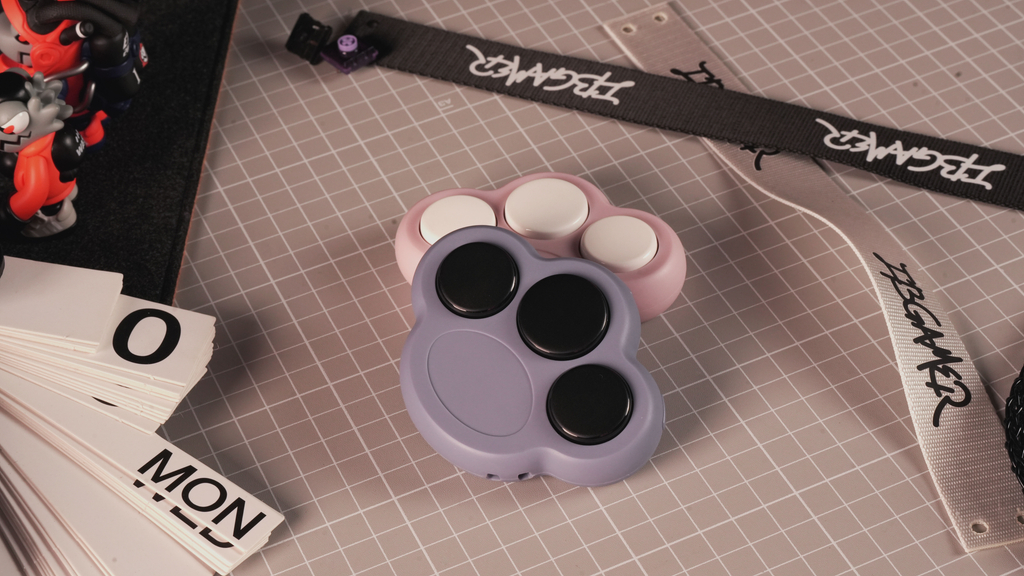
A compact product such as ComboPaw is designed around this idea. Its small form factor makes it easy to carry, while its removable low-profile mechanical switches allow users to physically test different switch options.
The important point is that a switch tester does not replace a leverless controller. It simply helps you understand one component before making a larger purchase.
Low-Profile Switches: What Should You Know?
Low-profile switches are another option you may encounter when researching leverless controllers. Compared with standard mechanical switches, low-profile designs are generally more compact and are often paired with shorter-travel button designs. This can contribute to thinner controller designs and a different overall button feel. However, “low-profile” describes the physical design of the switch rather than automatically describing its performance. Two low-profile switches can still feel different because of differences in actuation force, travel, spring characteristics, and switch design. If you are considering a compact leverless controller, trying a low-profile switch before buying can therefore give you a better idea of whether you like this type of button feel.
What Else Should You Check When Choosing a Leverless Controller?
Once you understand your switch preference, there are still several other factors to consider.
Layout
The button layout determines where your movement and attack inputs are positioned. Standard, split, ergonomic, and other layouts can create very different hand positions.
A switch you like will not necessarily make a controller comfortable if the layout does not suit you.
Button Spacing
Spacing affects how easily your fingers move between inputs. Some players prefer a compact arrangement, while others may feel more comfortable with additional space between buttons.
Controller Size
Consider how you normally play. A larger controller may provide more room for your hands, while a smaller one can be easier to carry.
Hot-Swappable Design
If you are still experimenting with switches, a hot-swappable controller gives you the option to change compatible switches later.
This can be useful if your preferences change or if you want to experiment with different button feels without replacing the entire controller.
Platform Compatibility
Finally, check whether the controller supports the platform you intend to use. Compatibility can vary between PC, PlayStation, Xbox, Nintendo Switch, and other platforms.
These factors are just as important as the switches themselves when choosing a complete controller.
Conclusion
Testing switches before buying a leverless controller is a simple way to understand what kind of button feel you prefer.
You can start by comparing actuation force, travel, reset feel, and switch type, then move on to repeated presses and simple fighting game inputs. A switch tester makes this process more convenient by allowing you to compare different switches without buying a complete controller first.
Once you know what feels comfortable, you can use that information when comparing leverless controllers, layouts, and button configurations.
In other words, test the switch first, then choose the controller around your preferences. The switch is only one part of the experience, but understanding it can make the process of choosing a leverless controller much easier.