
How Should You Set Up Leverless Controller for Marvel Tōkon
As Marvel Tōkon attracts more fighting game players, the community is already experimenting with different controller layouts. On Reddit, players have been discussing leverless button mappings for Light, Medium, Heavy, Assist, Quick Skill, Quick Dash, and Tag, with some even trying thumb-accessible buttons for faster inputs.
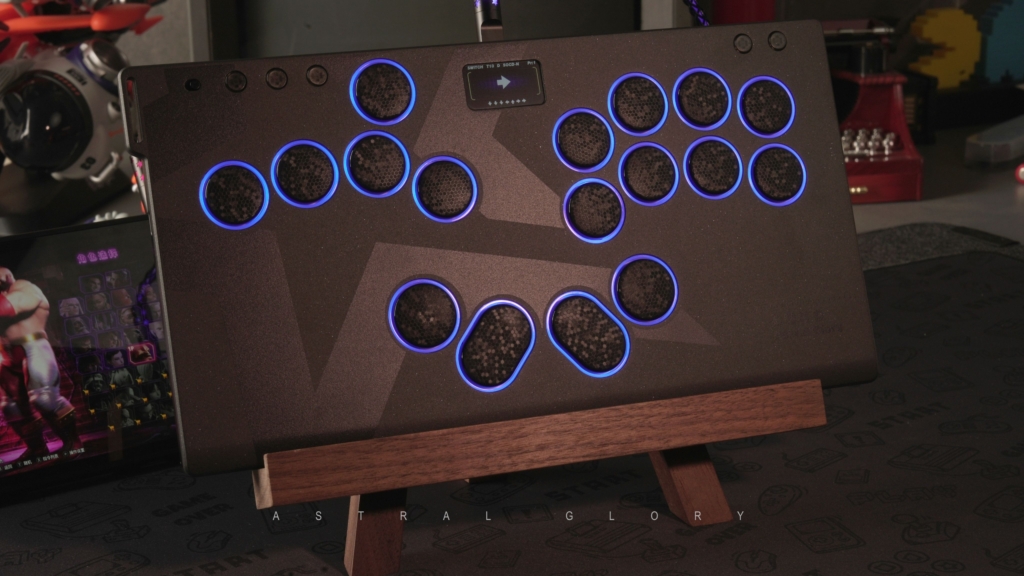
This got us thinking: could the 17-button HautePad Emotion III-17 give Marvel Tōkon players more freedom to create their ideal setup? With fully remappable inputs, players can experiment with different layouts and find what works best for them.
Please read the following, we’d love to hear your thoughts and feedback on controller layouts for playing Marvel Tōkon. Your suggestions can help other players and inspire us to develop the next generation of controllers.
How Does Marvel Tōkon Work?
Marvel Tōkon: Fighting Souls is built around a 4v4 team-based fighting system. Players choose four characters and control one character at a time, while the other members of the team can support the active character through assists and character switching.
The game’s combat revolves around combining basic attacks, special skills, assists, and team mechanics. Players can call different teammates to assist during combat, while directional inputs and specific button combinations can be used for character switching and other actions. This means players need to manage both their active character and the rest of their team while maintaining control of movement and attacks.
Unlike a traditional one-on-one fighting game, Marvel Tōkon therefore requires players to keep track of more actions and more character-related inputs during a match. As players become more familiar with the game, the speed and consistency with which these commands can be accessed can become an important part of their gameplay.
Why Is a Leverless Controller Interesting for Marvel Tōkon?
For players who prefer all-button controllers, Marvel Tōkon creates an interesting opportunity to rethink the traditional button layout. Unlike a fight stick, which uses a joystick for movement, a leverless controller uses dedicated buttons for left, right, up, and down. This allows players to keep their hands in a relatively fixed position while using the remaining buttons for attacks and other commands.
This becomes particularly useful in a game with multiple actions to manage. Instead of trying to fit every command into a standard layout, players can experiment with where frequently used inputs should be placed. For example, Assist, Quick Skill, Dash, and character switching could be assigned to buttons that are easier to reach during fast-paced situations.
The advantage is not simply having more buttons. It is having more control over the layout. Players who frequently use Assist may want it close to their attack buttons, while others may prefer a thumb-accessible position. Similarly, players who rely heavily on Quick Skill or character switching may benefit from giving these actions their own dedicated buttons.
Of course, adding more buttons does not automatically improve performance. A good layout should feel intuitive rather than crowded. The goal is to create a setup that matches your muscle memory, character choices, and playstyle, giving you quick access to the actions you use most.
What Could a Marvel Tōkon Layout Look Like?
As Marvel Tōkon is still new, there is no widely established standard for leverless controller layouts yet. Players are still learning which commands they use most, which inputs need to be immediately accessible, and which buttons can comfortably be placed farther from the main attack area.
A traditional fighting game layout is usually built around a relatively fixed set of attacks and movement inputs. Marvel Tōkon introduces more team-based commands, which may lead players to rethink how they organize their buttons.
For some players, Assist may be one of the most frequently used commands. Others may find Tag, Quick Skill, or Dash more important depending on how they play their team.
There may also be differences between characters and team compositions. A command that feels essential for one player might barely be used by another.
What Are Players Looking for in a Marvel Tōkon Controller?
When a new fighting game introduces a different combination of mechanics, controller design does not necessarily have to follow the conventions established by older games.
Players may eventually discover that they want:
More easily accessible buttons for team commands
Different button spacing
Additional thumb-accessible inputs
More flexibility for remapping
Different layouts for different characters or teams
A more compact or ergonomic design
But these are only possibilities.
We don’t want to assume what players need before the community has had enough time to develop its own habits.
That is why discussions around Marvel Tōkon’s controller layouts are worth following. The most useful ideas may come from players who spend hundreds of hours actually playing the game.
Can the HautePad Emotion III-17 Work for Marvel Tōkon?
Yes. The HautePad Emotion III-17 is fully suitable for playing Marvel Tōkon. Its 17-button layout and fully remappable inputs give players plenty of flexibility to assign the game’s different commands according to their preferred setup.
The controller features 0.8 mm fast-trigger switches, providing quick and precise inputs for fighting games. Its PBT dye-sub keycaps offer a durable and comfortable surface for extended play, while the large color display provides real-time input feedback, making it easier to monitor your inputs during practice.
With its combination of 17 programmable buttons, fast inputs, and broad platform compatibility, the HautePad Emotion III-17 can be used comfortably for Marvel Tōkon while giving players the flexibility to customize their controls.
Help Us Understand the Future of Marvel Tōkon Controllers
If you’ve been playing Marvel Tōkon with a leverless controller, we’d like to hear about your experience.
Which buttons do you use the most? Which commands do you wish were easier to reach? Does your current layout feel comfortable during longer sessions?
You don’t need to have a perfect setup or a professional-level configuration. Even small frustrations can reveal useful ideas for controller design.
And if you use a HautePad Emotion III-17, we’d be especially interested in hearing how you’ve chosen to use its additional buttons.
As Marvel Tōkon’s competitive scene develops, player feedback could help us understand what the next generation of fighting game controllers should look like—and what features players actually want to use.
So, what would you change about your current controller for Marvel Tōkon?
Join our Discord community and share your ideas with us and other Marvel Tōkon players.